• Skip to primary navigation
  • Skip to main content
  • Skip to primary sidebar

Quilter's Thread

Quilting Inspiration and Education

  • Home
  • About Lisa
  • Gallery
  • Shop
    • Cart
    • QT Summits
    • Patterns
  • Events
    • Calendar
  • Contact

Find out what Profile is all about….

November 12, 2014 By Lisa Berentsen

In the app, on the main screen at the bottom left is the Profile icon. This area of the app contains information about you and your activities. Main screen_profile
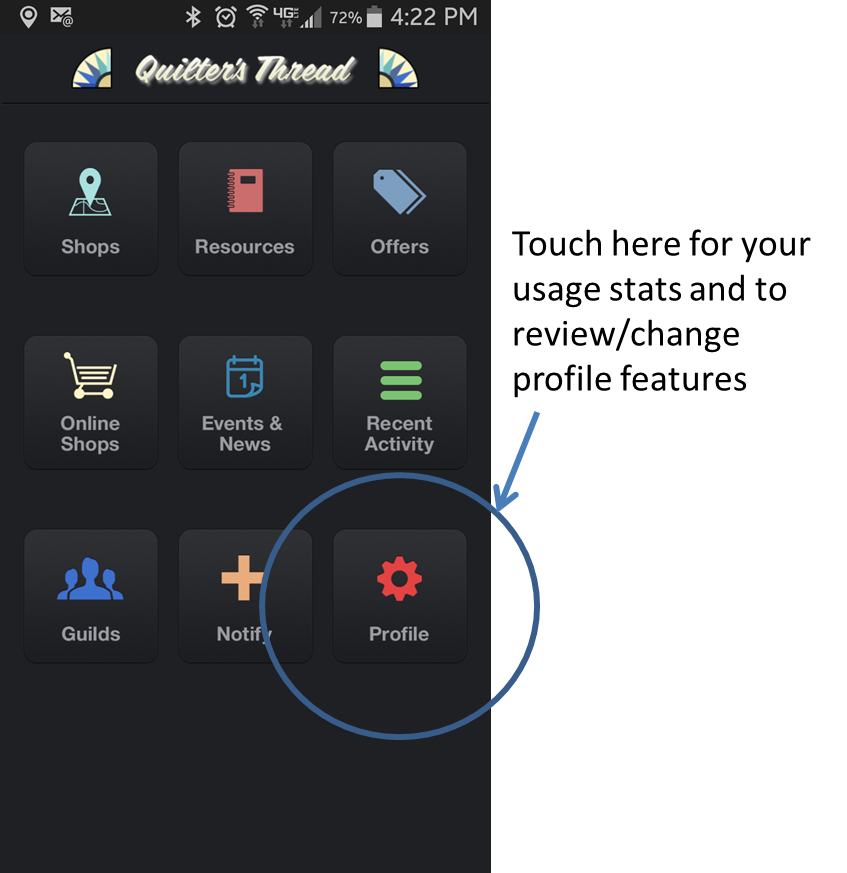
To enter, touch the icon. You’ll first see the stats-

  • how many favorite departments, organizations and people you are following and how many are following you
  • how many plugs you’ve made and replies you’ve received
  • how many likes you have given and received

Touch the arrow next to “Favorites” and use the tabs at the top for more info on your followers and those you are following.

Touch the arrow next to “History” to see your plugs and replies.

Touch the arrow next to “Likes” and use the tabs to see what Likes you’ve givStats pageen and received.
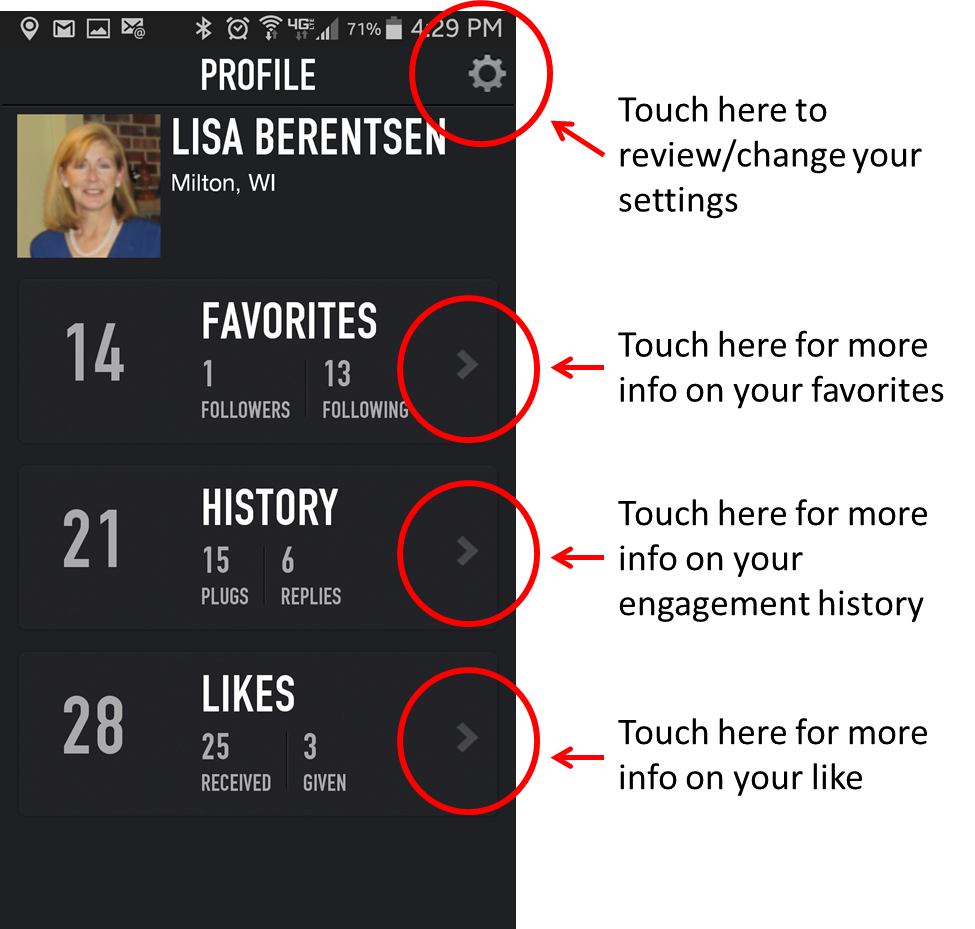
Touch the settings icon in the upper right corner to view or edit your account information.

Your name and email address carry over from your original sign up. These are the only pieces of information that are required to use the app. The other information can be useful to use in determining what content we include in the app, but it is not used or shared for marketing purposes.

Make any changes desired to your name, email address, add your zip (this helps with location-based functions,) indicate your gender and birth date if desired.settings 1
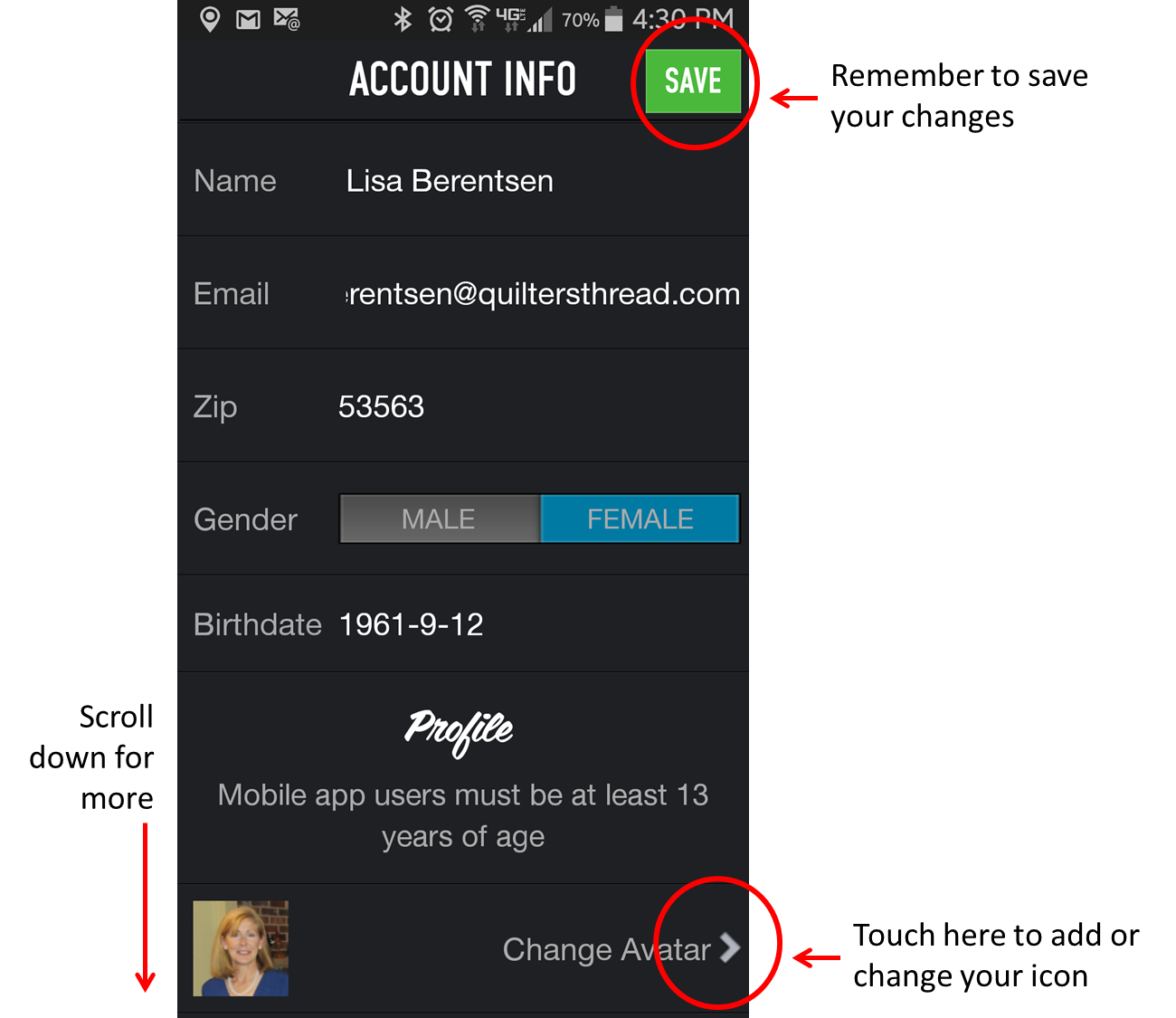
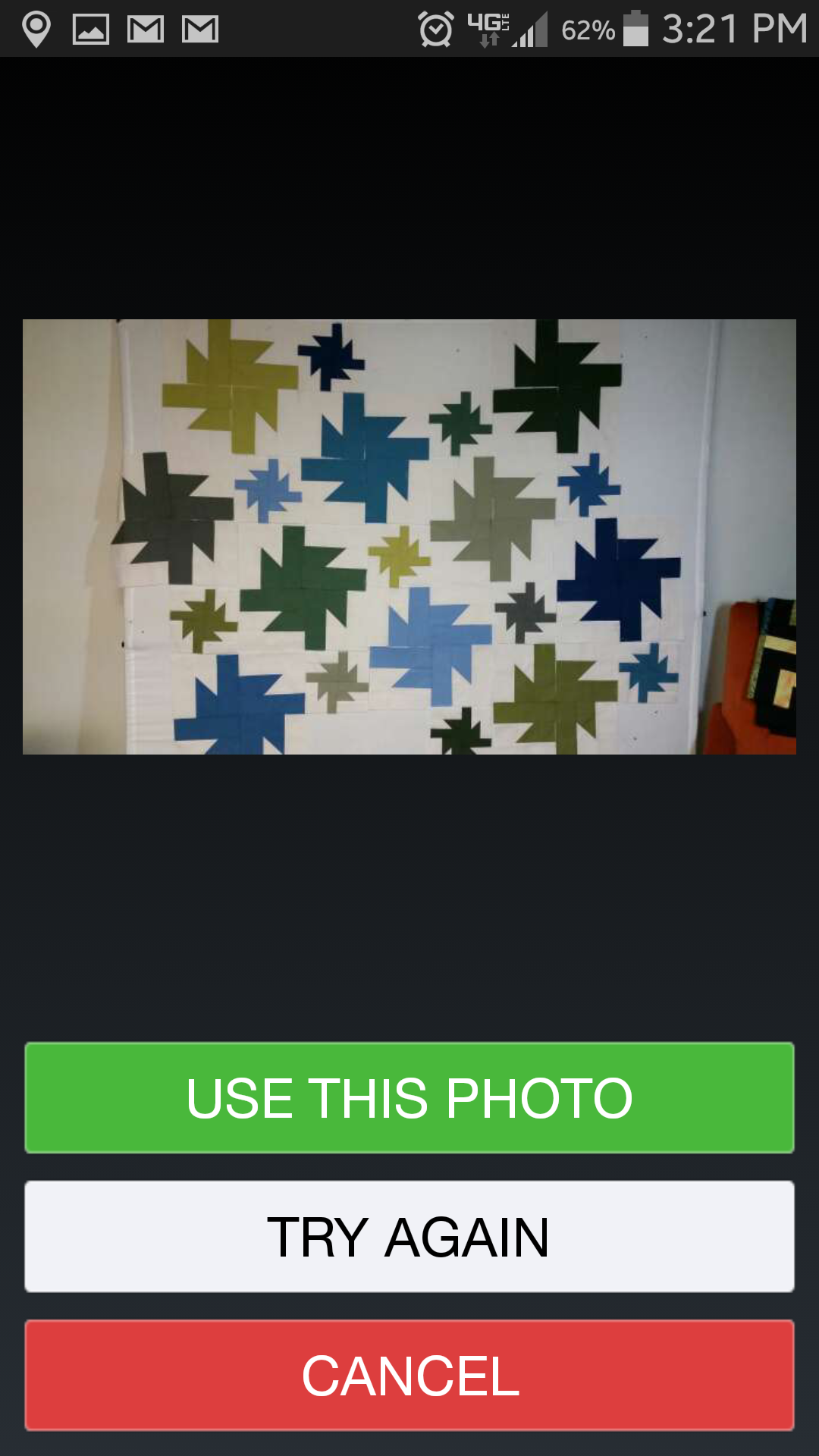
Scroll down a bit, you’ll see the words “Change Avatar” with an arrow. If you would like to include a picture or a graphic to identify yourself, touch that arrow. If your device has a camera and you want to take a photo, choose take a photo. Take a photo with your camera- I’m going to use this quilt- and a preview will appear on the screen. Touch the “Use” button to use this picture. Touch the retake button to take a different picture.  To exit without taking a picture, touch the retake button, then the cancel button.

If you have a library of photos your device, touch “choose from library.” Elect the folder your picture is in, and the picture you would like to use. If you don’t like the picture, choose “try again” to choose another picture. Choose cancel to get back to the avatar screen. Choose use this photo to select an avatar. You can change this picture whenever you desire by going to profile and editing.

Scroll down for more profile information. You’ll see where you can change your password. To do so, touch the arrow and follow the directions on the screen.settings 2
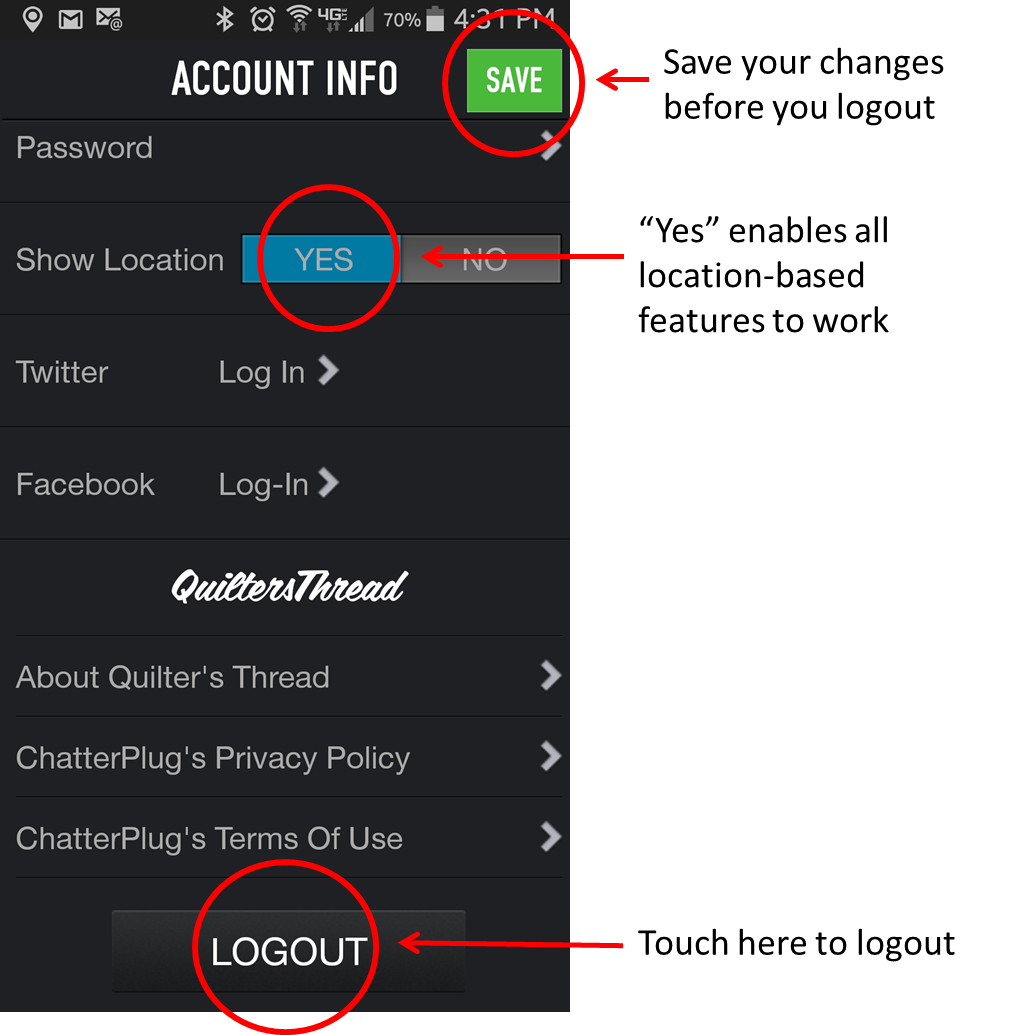
Show location should default to “Yes,” this means location services are on so the location-based features (like mapping) will work.

To have your Quilter’s Thread posts also posted on your Twitter or Facebook accounts, touch the appropriate arrow and follow the instructions on the screen.

Further down, you can read about Quilter’s Thread .

Quilter’s Thread is powered by a platform called “Chatterplug.” The privacy policy and terms of use can be accessed here. Basically, QT and Chatterplug will not use your information for marketing purposes, and, if you try to post something with objectionable or obscene language, it will be blocked.

Finally, if you need to Logout from the app (to let someone else login, for example,) you can do it here. However, if you have made changes on the profile page, you should save the changes before you logout or they will be lost.

That’s the gist of the Profile section. As always, if you have any questions, contact us at support@www.quiltersthread.com


Ask Quilter’s Thread, We’ll Respond

November 6, 2014 By Lisa Berentsen

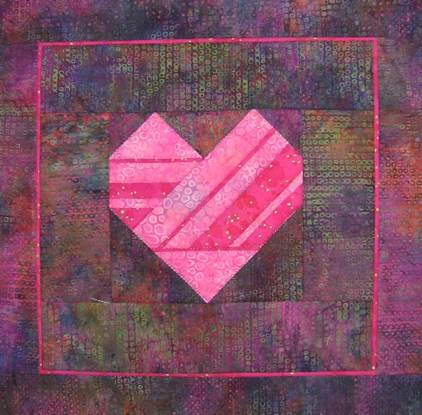
Quilter’s Thread is here to be a resource to you. One of our app usersQuilt- Heart likes the quilt we use as logo to our Patterns Department, so we wrote it up and posted it in the Patterns Library.

That’s EXACTLY what we love. If you want us to alter, design, figure, research, or find anything related to quilting, we’ll give it our best shot. And, chances are, someone else is interested, too, so we’ll share it on the app.

We intend to start posting a series of holiday patterns on Thursdays on our quilt blogs. We surveyed the app users asking if you’d prefer Christmas patterns, or Thanksgiving and Christmas patterns. The majority said both, so you’ll be seeing Thanksgiving next Thursday, a Thanksgiving/Christmas combo the following Thursday, then we’ll be focus on Christmas only.

Also, if you’re interested in Christmas patterns, check out the Trees of Christmas that we posted in the Pattern Library on the app last year (during our testing phase.)

Happy Quilting.

Tuesday Tutorial: How to Interact with Others on Quilters Thread

October 28, 2014 By Lisa Berentsen

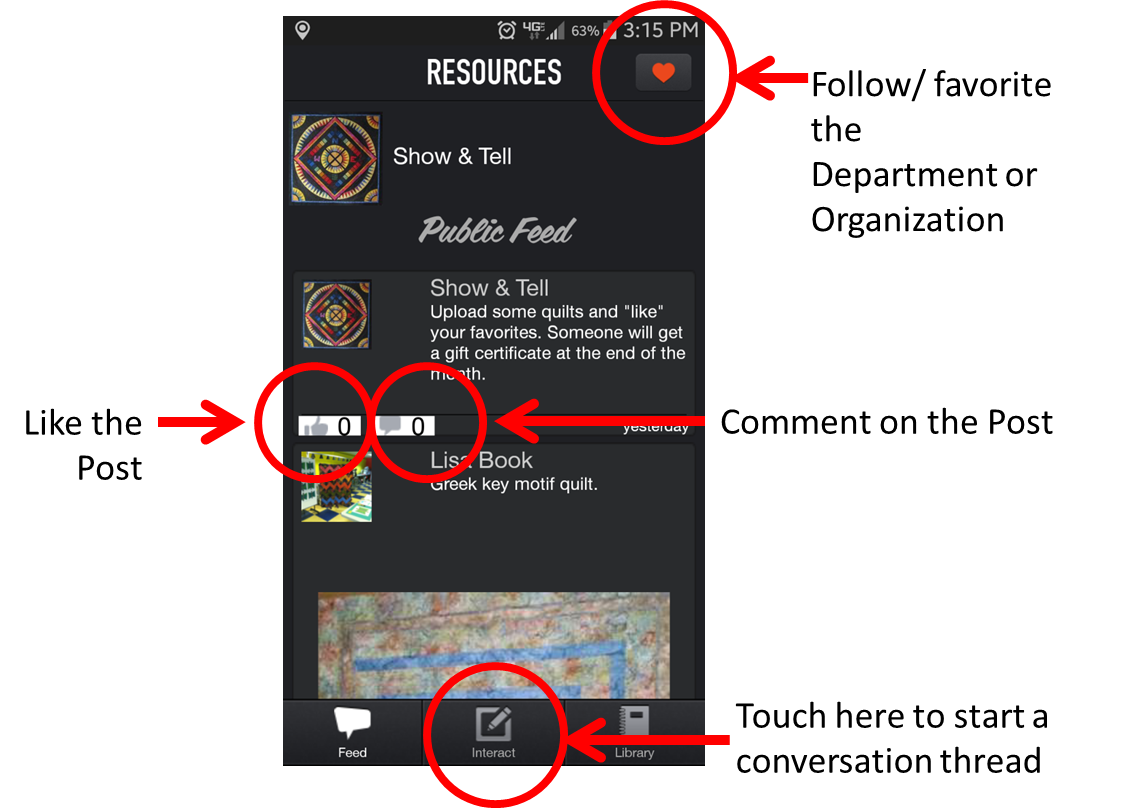
When you enter any department on the app, the first thing you see is the Public Feed. Interaction is what Quilter’s Thread is all about and it’s very easy to be part of it.Tutorial 1

First of all, if you like a department or shop and want to receive notifications, touch the heart at the top right corner of the feed and you’ll be “following” that area.

In any department you can scroll through the feed and read and see posts from others.

If you see something you like, go ahead and hit the thumbs up button to indicate that you like it.

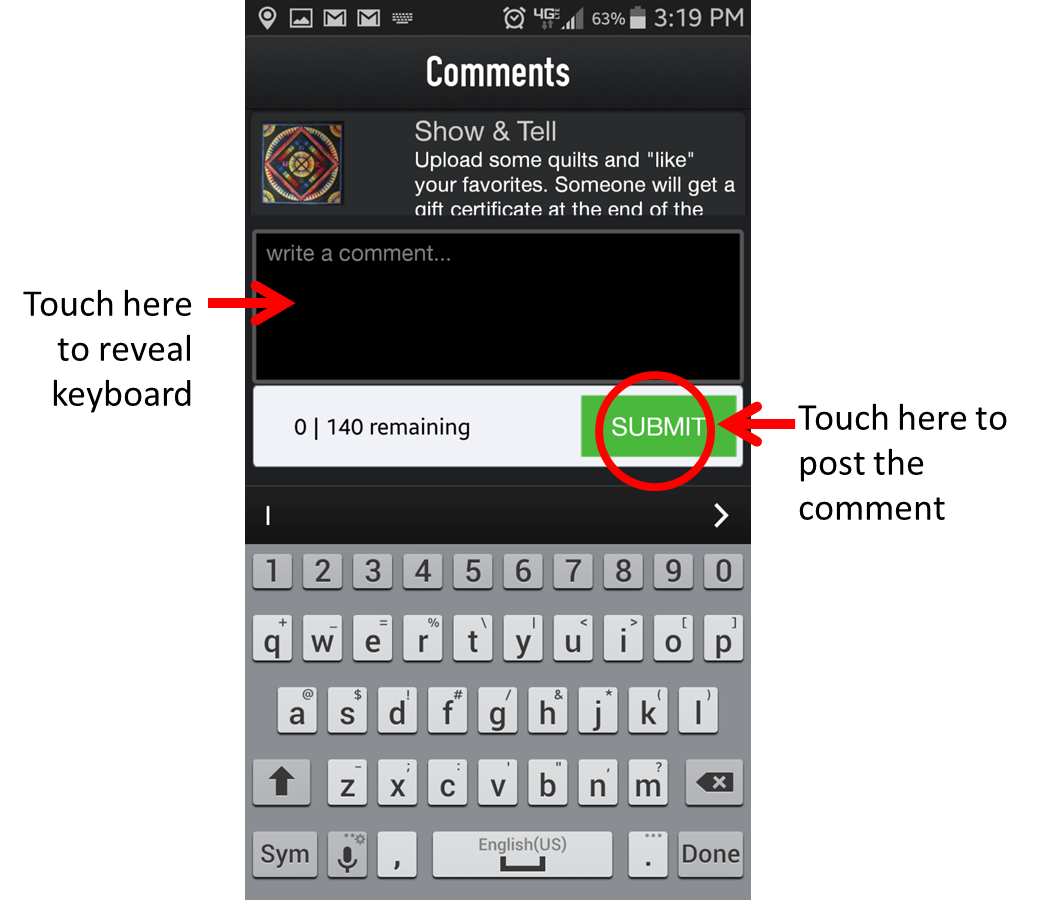
Comment on a post: If you have a comment to add, touch the talk bubble button, a screen comes up that says “Write a comment.” Tutorial 2Touch that box, your keyboard will appear, so you can type your comment. When you’re done, touch the Submit button and your comment posts.
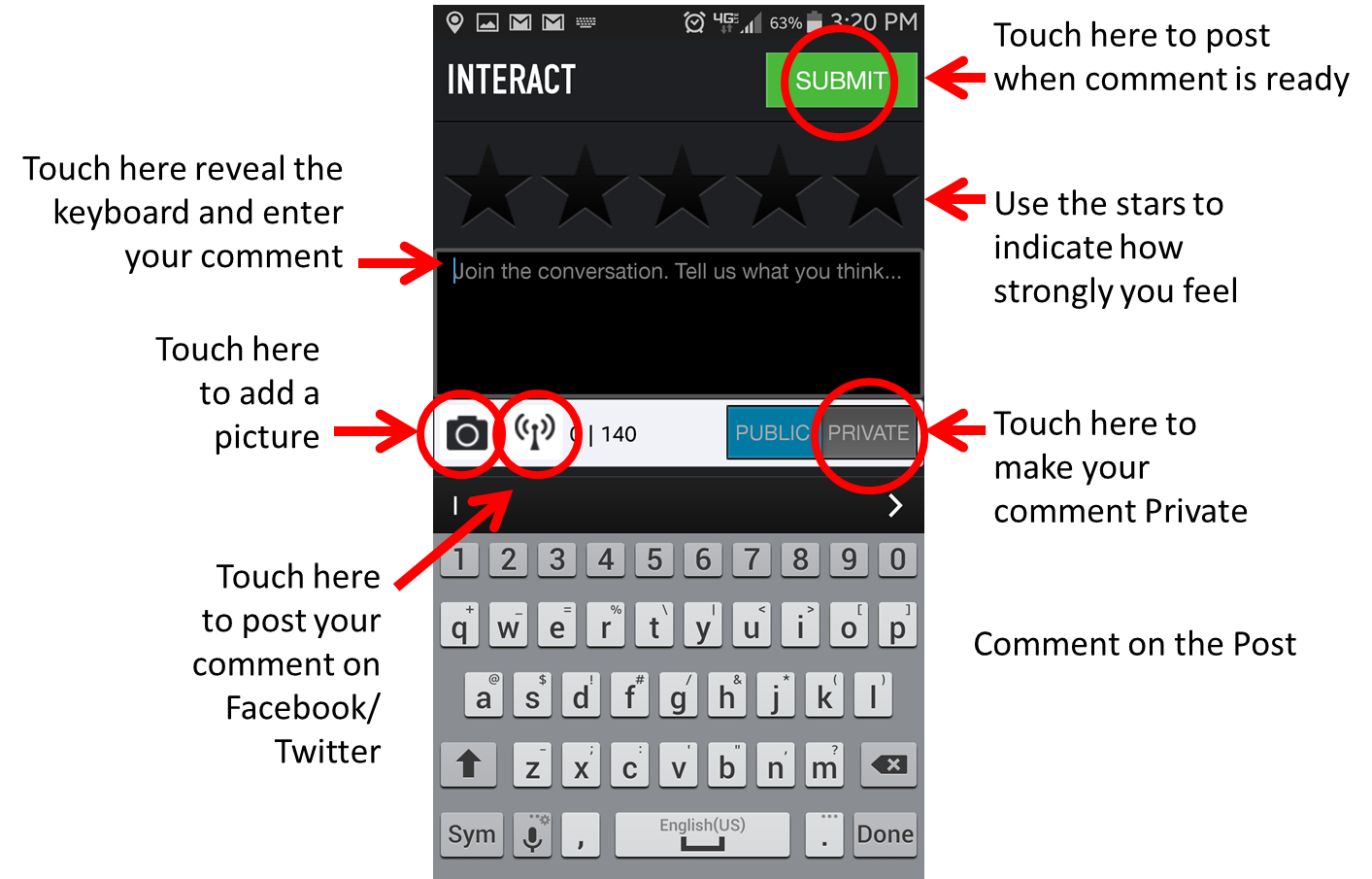
Start a Thread: To start a discussion, touch the interact button. You’ll be prompted that your comment can be public or private. Private comments will go to the person who is responsible for that department, shop, whatever. When you clear the prompt screen by touching the X, you’ll see that the comment defaults to “Public” if you want it to be “private” thought the private button.

When you touch the screen that says “Join the conversation,” a keyboard will appear to type your thoughts. If you have a sentiment to express, you can touch the stars to indicate how strong your feelings are.Tutorial 3

If you want your post to also be posted to your Facebook and/or Twitter account, touch the broadcast button and indicate which you want. For the automatic posts to work, you will need to have your Facebook and Twitter accounts entered into your profile. (If you can’t figure it out, you’ll hear about it in next week’s tutorial.)

If you touch the camera icon, you’ll have the option of adding a picture to your post. To take a picture, select that button and your camera will be activated to take a picture. If you don’t like the picture select re-try and do it again. If you like the picture, choose ok and follow the screen prompts to post it. When your post is ready, simply touch the “submit” button and you’re good to go.Screenshot_2014-10-28-15-21-23

If you want to post a picture from your library, touch the camera button, select the “Choose from Library” button, and select the picture you want from your library. Again, when your post is ready, touch the submit button.

Remember, the interaction features work for any feedback channel- those in the Resources Department, shops, guilds, whichever.

Next Tuesday’s Tutorial will cover the Profile features in the app.

As always, if you have any questions at any time, contact us through the app or at support@www.quiltersthread.com.

Happy Quilting.

What the heck is going on at Quilter’s Thread?

October 23, 2014 By Lisa Berentsen

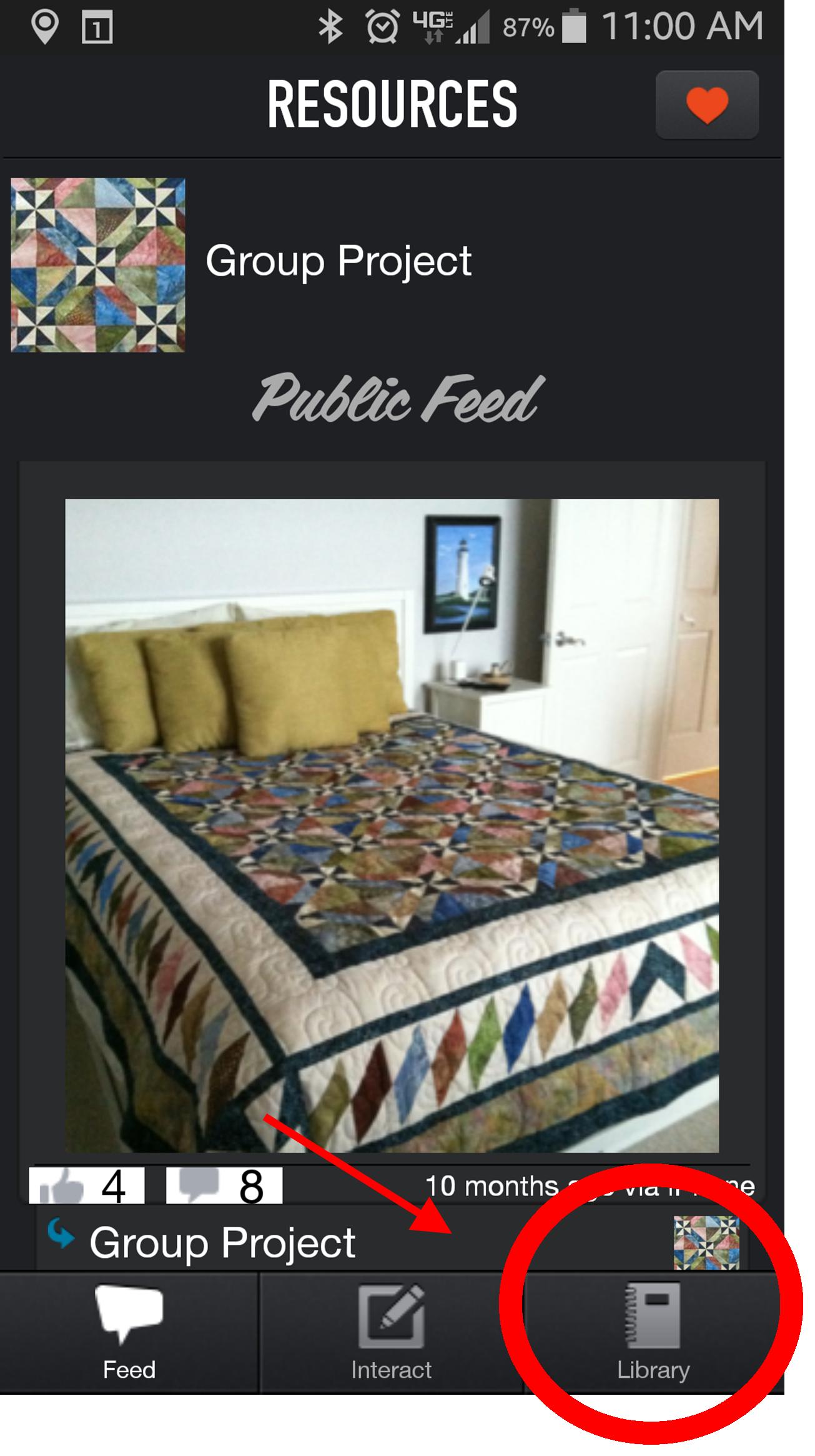
Well, a lot. We’re continually building our resource libraries. To find the libraries, touch the “Library” button at the bottom right of any of the departments in the Resource category. (See the screenshot to the right.)Library screen shot

App Tutorials- We’ve worked through the issues with third party video-sharing services, and are reliably providing video content in the app. We’re started by posting tutorials about using the app in the “App Tutorial” library. The first, an overview of the app, was posted Tuesday. New posts will continue every Tuesday until we cover all of the app features.

Group Project- The pattern for the first group project is almost complete. The first part of it will be posted tomorrow, with the complete pattern posting next week. You can find the pattern (pictured in the screen shot above) in the “Group Project” library.

Patterns- Next Thursday, we’ll get started on a series of holiday patterns. We’re still deciding if we should include some Thanksgiving themes, or head right into Christmas.  Please respond to the survey in the app. It will show in a white box at the top of your feed in the Patterns Department.

Quilting & Finishing- I love the method posted for binding completely by machine. Finishing the quilt isn’t the big chore it used to be for me. My (adult) son says he misses the raw edges, but I’m happy that I’m no longer using quilts that haven’t been bound. Use the feed to tell us what you’d like to see us cover next.

Show & Tell- Teri Brown shared two quilts last month, and one of them got the most likes, so she got a gift certificate good at any Quilter’s Thread member shop. Share your quilts, you could win, too.

Sizes and Measures-  The library has:

  • Yardage Measures
  • Mattress and Quilt Sizes
  • Measures for Strips and Squares
  • Diagonal of a Square Measures
  • Binding Strips and Yardage (for various width bindings and for Susie’s Magic Binding)
  • Next up is a Backing Calculator

 The Basics- I have to say, I use this library often to reference the directions for making starch. Most commercial starches flare up my asthma, so I make it the old fashioned way. With only two ingredients- water and corn starch- you’d think I’d remember the recipe, but I never do.  After the holidays, we’ll be launching a beginning quilt making series in this department.

Shops, Online Shops, Organizations- Thanks to our member organizations, our app is free to users. Please patronize them. Each is unique and has something different to contribute to your quilt experience.head shot- little

Happy Quilting.

Lisa


« Previous Page
Next Page »

Primary Sidebar

Welcome!

Lisa Berentsen
I’m Lisa Berentsen, 
a teacher and artist who uses abstract geometric quilts to create images depicting beauty, balance, joy and hope. Share the passion and dialog. Create!

Live well, Quilt Well.

Newsletter

We'd love to keep you up to date on the latest with Quilter's Thread and share a free pattern with you. Never miss a post or a pattern, and get the best quilting content in the world delivered to your inbox each month.

Search Quilter’s Thread

Recent Posts

  • Free Falling Upward: Gravity and the Aspen Trees
  • What was wrong with Supernova?
  • “Wandering With Abandon” will be wandering for 2 years
  • Quick Quilt for Project Quilting 10.3 Challenge.
  • New Quilt: Promising First Date

Copyright Quilter's Thread© 2025